
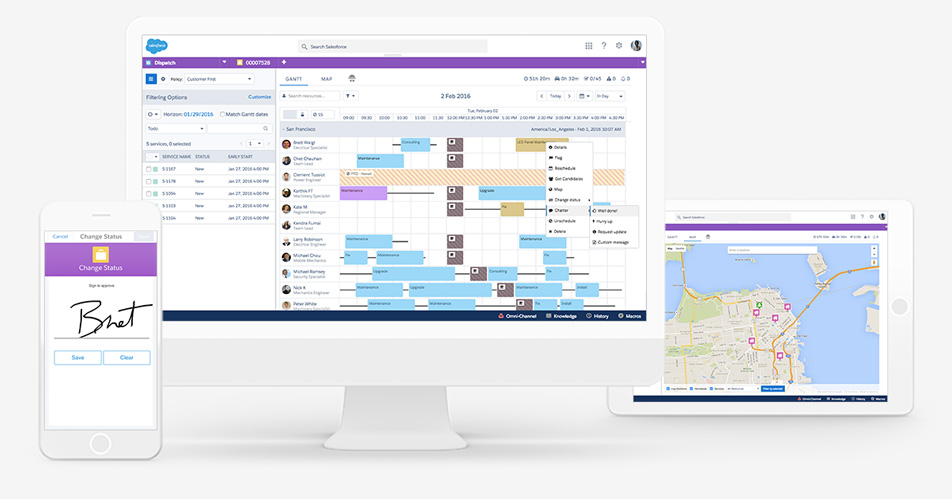
Salesforce Field Service Lightning runs the work your business does at a customer’s site: it turns a case or a contract into a work order, books an appointment with a technician who has the right skills and is in the right place, and gives that technician a mobile app to do the job and close it out. This guide covers what it does, the benefits and the metric each one moves, and how an implementation is sequenced.
Is Field Service Lightning the same as Salesforce Field Service?
Yes. Salesforce renamed Field Service Lightning to Salesforce Field Service, and it has also appeared as Agentforce Field Service. It is the same product: work orders, service appointments, the scheduling engine, the Dispatcher Console and the mobile app on top of Service Cloud. Most articles and job posts still say FSL.
What Salesforce Field Service Lightning does
Field Service Lightning has three parts. The core objects hold the work: what needs doing, where, for whom and with which parts. The scheduling engine and Dispatcher Console, installed as a managed package, decide who does each job and when, using your territories, skills, operating hours and a scheduling policy. The Field Service mobile app gives technicians their day, the job details and the customer’s history, works offline, and records parts, photos and signatures at the job.
Because it runs on Service Cloud, the case, the account, the asset and the visit all live on the same record, so a dispatcher, a support agent and a technician look at the same history.
Field Service Lightning data model: the objects that matter
- WorkOrder: the job, with its line items.
- WorkType: the template for a job: duration, required skills and the parts it usually consumes.
- ServiceAppointment: the scheduled visit, with its time window and status.
- ServiceResource: a technician or crew that can be scheduled, with skills and skill levels.
- ServiceTerritory: where resources work and their operating hours.
- ServiceContract: the entitlement that says what the customer is owed and how fast.
- Asset: the installed equipment the work is done on.
- ProductConsumed: the parts used on the job, drawn from van stock or a warehouse location.
Field Service Lightning benefits, with the metric each one moves
| Benefit | What changes | The metric to watch |
|---|---|---|
| Optimised scheduling | The engine assigns jobs by location, skills and availability instead of a dispatcher’s memory, and routes the day to cut driving | Travel time per job; jobs per technician per day |
| A complete job on the mobile app | Technicians see the asset’s history and the right parts before they arrive, and close the job on site, offline if needed | First-time fix rate; time from job completion to invoice |
| Customers kept informed | Appointment windows, arrival updates and delays are sent from the same record the dispatcher works in | Missed appointments; customer satisfaction after the visit |
| Real-time visibility for dispatch | Supervisors see every job’s status and technician location on the Gantt and can re-plan the day as it happens | SLA attainment; same-day re-schedules |
Pick the one or two metrics that matter most before you start, and measure them for a month beforehand, so the benefit is something you can show rather than assume.
Field Service Lightning implementation: the order that works
Scheduling can only be as good as the data it schedules against, so the build follows the order the engine reads it:
- Territories and operating hours: where you work and when.
- Resources and skills: who can do what, at what level.
- Work types: what each job needs, how long it takes and which parts it consumes.
- Scheduling policy: the rules and objectives that put them together, proved on one territory against real days from your own history.
- The mobile app: what gets primed offline, the job flow and the parts recording.
That sequence, and the five phases we run it on, are set out on our page on how a Field Service implementation is sequenced.
Rollout mistakes to avoid
- Switching on scheduling before the data is right. Most stalled rollouts share this cause: territories, operating hours or skills are wrong, so the engine sends the wrong technician and dispatchers stop trusting it.
- Rolling out everywhere at once. Prove the scheduling policy on a first territory, then widen it.
- Designing the mobile app last. If what is primed offline is not designed, the app is slow to open and still missing the one record the job needs.
- Skipping change management. Dispatchers and technicians need to see why the schedule changed; involve them in the pilot and review the policy with them.
- Never revisiting the policy. Review routes, travel time and first-time fix monthly, and adjust the rules as the business changes.
If you are past evaluating the product and need the build done, talk to a certified Field Service consultant.
Field Service Lightning FAQ
Is Field Service Lightning the same as Salesforce Field Service?
Yes. Field Service Lightning was renamed Salesforce Field Service, and for a while it carried the Agentforce Field Service name. It is the same product: work orders, service appointments, scheduling, the Dispatcher Console and the Field Service mobile app, running on top of Service Cloud.
What are the three parts of Field Service Lightning?
The core objects that hold the work (work orders, work types, service appointments, resources and territories), the scheduling engine and Dispatcher Console from the Field Service managed package, and the Field Service mobile app that technicians use at the job, including offline.
How is Salesforce Field Service licensed?
Field Service is licensed per user on top of Service Cloud, by role: dispatchers, the technicians who use the mobile app, and anyone else who schedules or is scheduled. The Dispatcher Console and the scheduling engine come from the Field Service managed package, installed into your org.
How long does a Field Service implementation take?
It follows the number of territories, work types and scheduling rules in scope, and whether parts and inventory are part of it. A first territory usually goes live ahead of the rest, so dispatchers prove the scheduling policy before it is rolled out.